—
SLIMBLE
Your key is a phrase of four words. The phrase is the account: enter it on any device and you get the same log. There is nothing else — no name, no e-mail, nothing to reset.
Write these four words down before you continue. They are the only key —
lose the phrase, lose the log.
Portion
or set the values directly
SLIMBLE
—
What this is
You photograph food. A model reads it against your whole day — what you have already
eaten, what your days usually look like, what you say matters to you — and returns a
judgement, not a calorie count. Then you decide, and press one of two equal buttons:
ate it or skipped it. Both are just data.
Hours, not calories
Photo estimates are ±20–30%; formulas for your burn rate are ±10%. A display reading
"−847 kcal" claims a precision the data cannot support, and once you notice it is wrong
you stop trusting the instrument. "About nine hours" carries the same information and is
honest about its own resolution. It is also more visceral: a currywurst with fries is not
a number, it is most of a working day on the clock.
The red curve
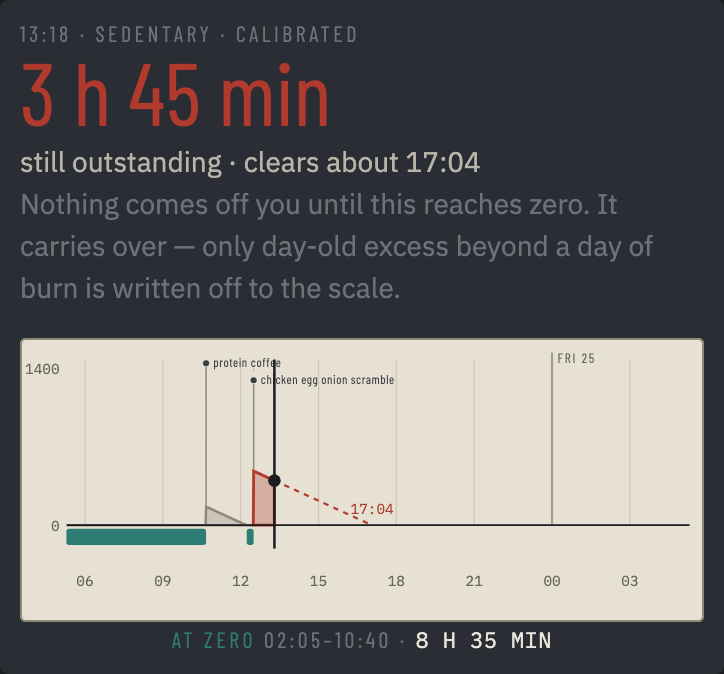
Everything you eat goes on the clock and burns off at your hourly rate. The red area is
what is still outstanding; the red dashed line runs forward to when it lands at zero. The ledger is
continuous — midnight resets nothing, and an evening that does not clear shows up
tomorrow as carry. Nothing is ever written off by itself: a feast stays on the clock
until it is burned, which is how a big day is paid back by a lighter one. When more
than a day of burn is on the clock you can decide to write it off to the scale instead
— it then counts as weight gained and takes packets off the butter wall.
Zero, and the teal band
Zero is break-even, not permission — there is deliberately no green anywhere. Fat comes
off only during time spent at zero: hours at zero × your rate is the entire
calculation. Eight hours a day at zero is roughly a kilogram a week. The teal band marks
that time, and only time the log can vouch for — a quiet log banks nothing, because
not logging is not fasting. A genuine fasting day still counts: weigh in that morning
and the ledger knows you showed up. Tap a teal band and the line under the chart reads
the whole run out: when it started, when it ended, and how long it lasted.
The day bar
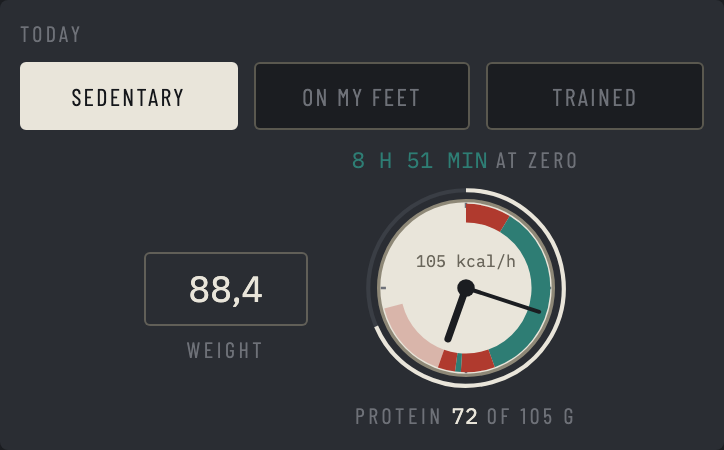
The dial is today on a 24-hour face, midnight at the top, and the two hands tell the time.
Red is time something was still on the clock, teal is time at zero, and light red is what
is still to burn before the next zero. Nothing is drawn for the rest of the day, because
it has not happened. The cream outer ring fills with protein toward your target, and your
hourly rate sits above the hub. Hours at zero sit above the dial, protein below it, and the
morning weigh-in goes in the box beside it.
What it will never do
It never forbids — it prices, in hours, and you decide. It never praises and never
scolds: praise turns a state into something earned, and earned things get spent. There
are no streaks and nothing to break. An exception is not a failure; it is a cost, paid
off by the same arithmetic as everything else. The only real failure mode is the log
going quiet.
Activity, weigh-ins, and calibration
Three activity levels set your rate for the day; sedentary is the default and the safe
direction — the app understates your progress rather than flattering it. Exercise is
never currency: movement lowers the curve but can never push it into credit. A morning
weigh-in feeds two things: a smoothed weight trend (a record of the past, never a
prediction) and, after a few weeks, calibration — which replaces every formula in here
with your measured rate. Claim "trained" more than the scale supports and calibration
quietly takes it back. The instrument becomes accurate by being used. The measured rate
changes once a week, to the middle value of that week's mornings, so one salty dinner
cannot move it; History says when it was set and when it next changes. A finished day
keeps the rate it was priced with: an update counts forward, never back.
The butter wall
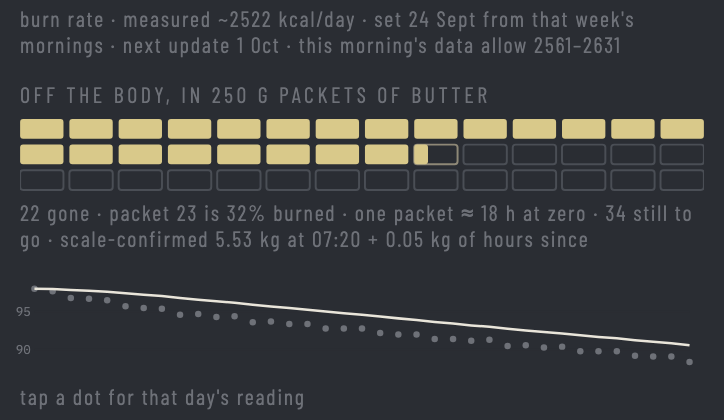
Fat that has come off, in 250 g packets of butter. The filled packets are what the scale
confirms at your latest weigh-in; the packet in progress grows with the hours at zero
since then. A packet is about 1,900 kcal, and the caption converts that into hours at
your rate. The line below is the weight trend: dots are weigh-ins, the curve is the
smoothed trend, and a tap on a dot reads that morning out.
The road ahead
Under the weight trend, History draws your measured weight running into a forecast: a solid
line for the pace you aim for, inside a band from your recent real pace to a cautious case.
Dots mark where the curves cross every five kilograms and your goal. It is redrawn once a
week with the rate, so the weigh-ins in between land on a fixed curve. Turn the phone for
the full chart, and drag across it to read any day. The weight in Setup is the one you want
to keep. Normal eating brings back about 1.5 to 4 kg of glycogen, water and gut contents, so
the diet stops about 2.5 kg lower on the scale; the shaded zone is where it has to land, and
the date is a range from the fast edge reaching its top to the slow edge reaching its bottom.
The calendar
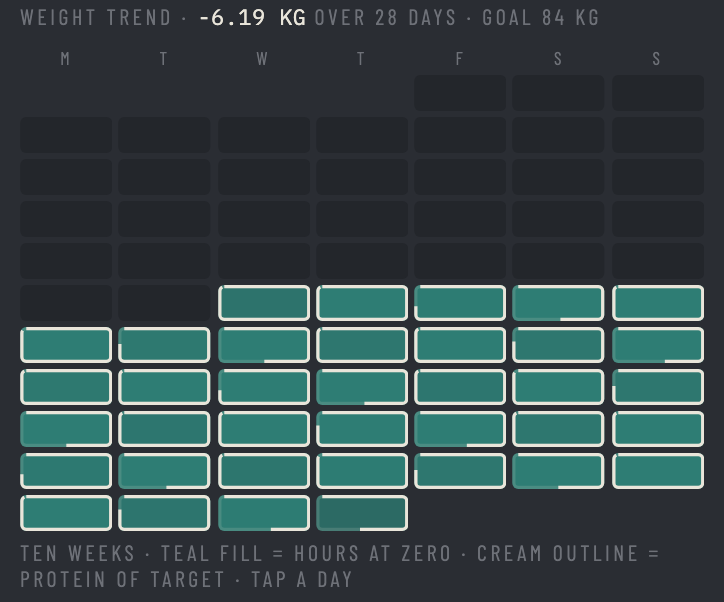
Ten weeks at a glance. The teal fill is a day's hours at zero, the cream outline is its
protein against your target. Tap a day to read it out.
Favourites and past meals
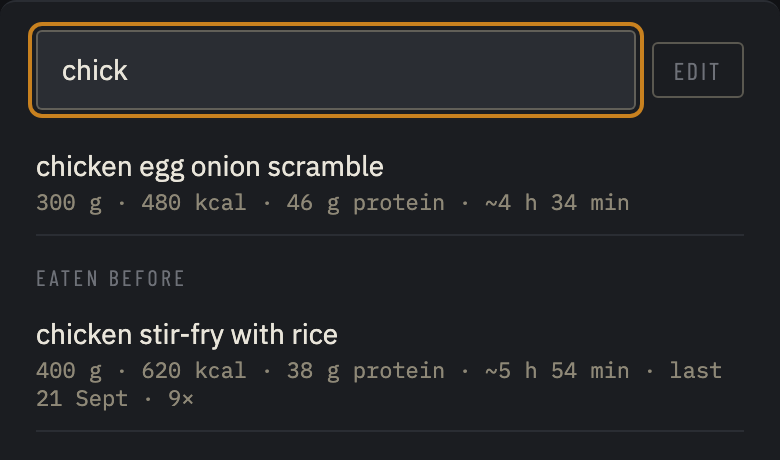
Star an eaten item in the log and it becomes a favourite: one tap in the ★ sheet puts
it on the clock again at the same portion, with no reading and no key needed. Typing in
the ★ sheet also searches everything you have eaten before, priced as you last had it; a
tap logs it now. Either way a short notice offers undo.
Portions
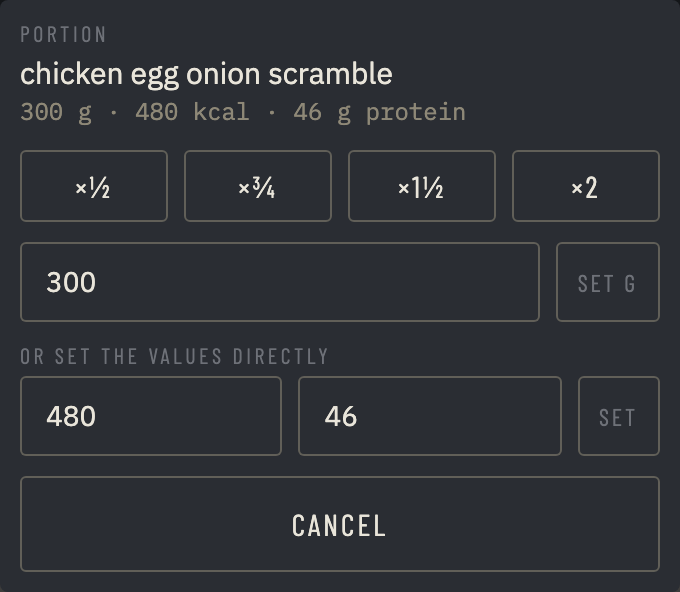
Tap the grams and hours at the right of a logged item to fix the amount after the fact:
halve it, take three
quarters, add half, double it, set the grams, or type kcal and protein directly. The hours
follow.
Your phrase, your data
The four-word phrase is the whole account: same phrase, same log, on any device — no
name, no e-mail, nothing to reset, and nobody can recover it for you. Photos are never
stored: they are read once and dropped, and only the item name, the estimate, the
reading and your decision persist, on a server in Germany. A reading sends the photo to
the model for the moment of the read; nothing else ever leaves.
Your key, your model bill
Readings run on Claude, using your own Anthropic API key — paste one into Setup
(get it at console.anthropic.com). It is stored encrypted, used only for your readings,
and a reading costs about two cents, a menu about five; Setup shows what yours have cost. Everything else — the clock, the
history, the projection — is free and needs no key.
How to read this
Red is food still on the clock. It burns off at
your hourly rate, and midnight does not reset it — what is left carries into tomorrow.
Teal is time at zero, the only time fat is actually coming off. Zero is break-even, not permission; there is no green.
Hours, not calories: a currywurst is not "1000 kcal", it is most of a working day.
Teal is time at zero, the only time fat is actually coming off. Zero is break-even, not permission; there is no green.
Hours, not calories: a currywurst is not "1000 kcal", it is most of a working day.
Today